Security
What Peekaboot exposes while it is on, and how to put a lock in front of it.
On a local run anyone who can reach
your application’s port can read everything under /peekaboot/** without signing in:
configuration, environment values, health, logs, migrations and full request traces.
Peekaboot’s own guard is off there. If anyone other than you can reach that port, secure
/peekaboot/** first or turn Peekaboot off.
Who can reach Peekaboot, and when it is on
Peekaboot switches itself on or off from the way the application was launched. An explicit property always wins.
| Launch | peekaboot.enabled |
dev-toolbar, storage.enabled, error-page.enabled |
security.enabled |
|---|---|---|---|
Local run: IDE, spring-boot:run, bootRun, java -cp target/classes … on a host that is not a container |
true |
true |
false |
Deployment: java -jar, a war, a native image, anything in a container |
false |
false |
true |
| Test | false |
false |
false |
Every switch except peekaboot.enabled itself also needs peekaboot.enabled=true.
What counts as a local run has the
full detection rules.
What that means for access:
- Local run. Anyone who can reach the port reads
/peekaboot/**without authentication. Bind the server to loopback (server.address=127.0.0.1) if you share a network you don’t trust. - Local run, error page. A browser request that fails gets the exception, its message and
its full stack trace. That page is served on the failing URL, so anyone who can trigger the
error sees it, not only someone who can reach
/peekaboot/**. - Deployment with
peekaboot.enabled=true. Peekaboot’s HTTP Basic guard challenges any/peekaboot/**request your own security has not authenticated. See If nothing else secures it.
Security-related properties
| Property | Default | Effect |
|---|---|---|
peekaboot.enabled |
detected | Serves the dashboard and its API. Off, nothing exists under /peekaboot/**. |
peekaboot.dev-toolbar |
detected | Injects the toolbar and captures headers, parameters and log messages into traces. |
peekaboot.enable-unmasking |
false |
Allows ?unmask=true to return real values. See Masking opt-ins. |
peekaboot.security.enabled |
detected | Arms the HTTP Basic fallback guard. |
peekaboot.security.username |
<artifact>-admin |
The guard’s username. |
peekaboot.security.password |
unset | The guard’s password. Unset, one is generated. |
peekaboot.security.credentials-file |
security.properties in the storage directory |
Where the generated password’s hash is stored. A path you set is written even while storage is off. |
peekaboot.storage.enabled |
detected | Whether Peekaboot writes any file. |
peekaboot.storage.dir |
${user.home}/.peekaboot/<groupId>.<artifactId> |
Where those files go. |
peekaboot.error-page.enabled |
detected | Serves the error page with exception and stack trace. |
peekaboot.error-page.override |
false |
Serves it even where the application has an error page of its own. |
Types and the remaining details are in Configuration.
What the dashboard and API show
This is the complete list. Anyone who can reach /peekaboot/** can read all of it.
| Data | Where | Masked |
|---|---|---|
| Every resolved property source, key and value | Environment tab | By key and by value shape |
Every @ConfigurationProperties value |
Config tab | By key and by value shape |
| Health status and per-component detail, custom indicators included | Overview | By key and by value shape |
Build and Git metadata (info.build) |
Overview | By key and by value shape |
| Datasource host, port, database name, user, product and driver version | Overview | Connection parameters only. User, host and database name are shown as is. |
| Process identity: OS user, uid, gid, pid, parent-process chain with command names | Overview | No |
| Machine: CPU count and model, physical memory, max heap, container runtime, every non-local IP address and its hostname | Overview, runtime.machine in the API |
No |
| Logger levels, configured and effective | Loggers tab | Nothing to mask. The API is GET-only, so levels cannot be changed. |
| Flyway migrations: version, description, script, type, duration, install time, status | Flyway tab | No |
@Scheduled tasks: schedule, last and next run, last failure’s exception type and message |
Scheduled Tasks tab | Failure text by value shape |
| Start and stop history with version, branch, commit and build time per run, unclean shutdowns | Lifecycle tab, /peekaboot/api/lifecycle/** |
No |
| Micrometer meters: names, tags, measurements | Meters tab | Tag values by key and by value shape |
| Up to 30 days of CPU, memory, thread, HTTP, connection-pool and log-event history, and the list of collected meters | Insights tab, /peekaboot/api/insights/** |
No |
| Request traces: span tree, span names, timings, tags, error messages, SQL text and bind parameters | Traces tab, toolbar | Tags, error messages, SQL and bind parameters by value shape only |
| With the toolbar on: request and response headers, query and form parameters, resolved controller | Traces tab, toolbar | Headers and parameters by key and by value shape |
| With the toolbar on: the message of every log event emitted inside a trace | Logs tab of a trace | No |
SQL text is shown as your JDBC instrumentation records it, literal values included where the statement carries them. Bind parameters are shown too, recorded on the query’s span. An application that also exports its traces, over OTLP say, sends them along unmasked. Request and response bodies are never captured. A log event emitted outside a trace is dropped.
With the toolbar on, every response carries
Server-Timing: trace;desc="00-<traceId>-<spanId>-<flags>", JSON API calls included.
Anyone who reads that header and can reach /peekaboot/** can open that request’s trace at
GET /peekaboot/api/traces/{traceId}/insights. Responses under /peekaboot/**, your
management base path, /static/**, /webjars/** and /error/** get no header.
Every /peekaboot/api/** response carries Cache-Control: no-store and
X-Content-Type-Options: nosniff, so a proxy or the browser’s cache does not keep it.
What the error page shows
The error page shows every detail Spring Boot’s ErrorAttributes has: the status, the request
line, the exception class, its message and the full stack trace. None of it is masked, and your
spring.web.error.include-* settings do not limit it. Requests that ask for JSON get Spring
Boot’s normal error response instead.
It is on for a local run and off everywhere else. By default it replaces only Spring Boot’s
whitelabel page, so an application with its own error page keeps it unless you set
peekaboot.error-page.override=true. peekaboot.error-page.enabled=false turns it off. See
Configuration, peekaboot.error-page.
What stays in memory and what goes to disk
Request traces, captured headers and parameters, log messages, environment values and config values stay in memory for the life of the process. They are never written to disk.
Peekaboot writes files only while peekaboot.storage.enabled is true, which is the default
for a local run only. The one exception is security.properties with an explicit
peekaboot.security.credentials-file.
| File | Written when | Contents |
|---|---|---|
insights.snapshot |
Storage on | The charts’ aggregated numbers, keyed by series id. No request data, property values or traces. |
lifecycle.jsonl |
Storage on | One line per start or stop: timestamp, pid, and version, time, branch, commit.id, commit.id.full, commit.id.abbrev, build.version, build.time. |
security.properties |
The guard generated a password, and storage is on or credentials-file is set |
A PBKDF2 hash of the generated password. Never the password itself. |
lifecycle.jsonl drops every other build-info and git-info entry, including the git remote
URL, the building user’s name and mail address, and anything else your build wrote into
build-info.properties.
The files live under ${user.home}/.peekaboot/<groupId>.<artifactId>/ unless
peekaboot.storage.dir says otherwise. On a POSIX file system the directory is created
rwx------ and the files rw-------. See Configuration,
peekaboot.storage.
Peekaboot leaves /actuator alone
Peekaboot reads Actuator’s data in-process. It adds nothing to
management.endpoints.web.exposure, and which endpoints /actuator/** serves is the same with
or without it. Don’t use management.endpoints.web.exposure to protect Peekaboot: it has no
effect on /peekaboot/**.
Peekaboot does set management.info.env, .java, .os and .process.enabled to true while
it is on. If you expose /actuator/info, it carries that extra content. See Configuration,
Spring Boot defaults Peekaboot
changes.
With Peekaboot off, nothing is served under /peekaboot/**, the UI assets included.
Actuator’s show-values does not apply
management.endpoint.env.show-values and management.endpoint.configprops.show-values have no
effect on the dashboard. Setting them to never does not blank the Environment and Config tabs.
Peekaboot’s own masking decides what those tabs hide. Peekaboot never sets either property, so
your own /actuator/env and /actuator/configprops behave as you configured them.
Masking
Masking is on by default and has nothing to configure. It replaces a value with ****** in:
- environment and
@ConfigurationPropertiesvalues - health details,
info.buildand datasource connection parameters - Micrometer meter tags
- captured headers, query and form parameters, span tags, span error messages, SQL text and bind parameters
- the last failure message of a scheduled task
- the database connection parameters in Peekaboot’s startup log line
Your own SanitizingFunction beans also run on environment and config values, so a value they
mask reaches the dashboard as ******.
What gets masked, and how
Two rule sets run together.
By key name. A key is sensitive when one of these words appears in it as a whole token, separated by any character other than a letter or digit, or by a camelCase boundary. Case does not matter.
password              passwords             passwd
passwds               pwd                   passphrase
passphrases           secret                secrets
client-secret         client-secrets        token
tokens                access-token          refresh-token
id-token              auth-token            bearer
credential            credentials           api-key
api-keys              apikey                apikeys
access-key            access-keys           private-key
private-keys          secret-key            secret-keys
signing-key           signing-keys          encryption-key
encryption-keys       authorization         auth
session-id            salt                  signature
sig                   certificate-password  certificate-private-key
- A sensitive key masks its entire value.
- Words match only as whole tokens:
designandsignalare not masked. - These key patterns also mask:
vcap_servicesandsun.java.commandanywhere in the key,^vcap\.services.*$, and^spring[._]application[._]json$. cookie,set-cookie,http.request.header.cookieandhttp.response.header.set-cookiemask only as the entire key.server.servlet.session.cookie.*stays readable.- The exact key
PWD(the shell’s working directory) is not masked.db.PWDand aPWD=parameter inside a value are. - Bare
keyand barecertificateare not in the list, soserver.ssl.key-storeandserver.ssl.certificatestay readable. - A key whose last token is
uriorurlskips the word list. Only the four key patterns above apply to it.…provider.<x>.token-uristays readable, and so doesapp.password-url.app.token-uri.passwordis masked.
By value shape. These patterns mask a credential inside any value, whatever its key. Only the matched part is masked, so a JDBC URL keeps its host and database name.
| Shape | Example |
|---|---|
| JWT | eyJhbGciOi….eyJzdWIiOi….… |
| PEM private key, header to footer | -----BEGIN PRIVATE KEY----- … -----END PRIVATE KEY----- |
| AWS access key | AKIA…, ASIA… |
| GitHub token | ghp_…, gho_…, ghu_…, ghs_…, ghr_…, github_pat_… |
| GCP API key | AIza… |
| Slack token | xoxb-…, xoxp-… |
| Stripe live key | sk_live_…, rk_live_… |
| OpenAI key | sk-proj-…, legacy sk-… |
| Anthropic key | sk-ant-… |
| Credentials in a URL | postgres://user:secret@host, redis://:secret@host |
| Oracle thin URL | jdbc:oracle:thin:user/secret@host |
| URL or connection-string parameter with a sensitive name | ?password=…, &token=…, ;pwd=… |
| Command-line option with a sensitive name | -Dspring.datasource.password=…, --api-key=… in JAVA_TOOL_OPTIONS |
A parameter or option is judged by its name with the key-name rules above. It needs its
marker: a bare password=hunter2 without a leading ?, &, ;, -D or -- is not masked.
A PEM block without a footer masks to the end of the value.
The key names and value shapes above are the complete set.
Masking is not exhaustive. A credential with no recognisable shape under a key that is not
listed is shown as is. INSERT INTO users (password) VALUES ('hunter2') is not masked, because
SQL masking goes by value shape only and does not know column names. Assume any captured trace
can contain plaintext SQL and plaintext request data.
What is left unmasked entirely
- log message content
- process identity: OS user, uid, gid, pid, parent processes
- machine facts, IP addresses and hostnames included
- the datasource user, host and database name
- the run history
- the error page, message and stack trace included
- anything no key-name rule and no value shape recognises
Two opt-ins before a real value is shown
Masked values are revealed only when both are true:
peekaboot.enable-unmasking=true. The default isfalse.- The request is
GET /peekaboot/api/actuator/all/insights?unmask=true. No other endpoint acceptsunmask.
The parameter alone does nothing. With unmasking enabled, the Environment and Config tabs show a “Show secrets” toggle. It is absent otherwise. Its state is not kept: a reload or a new tab starts masked. See The dashboard.
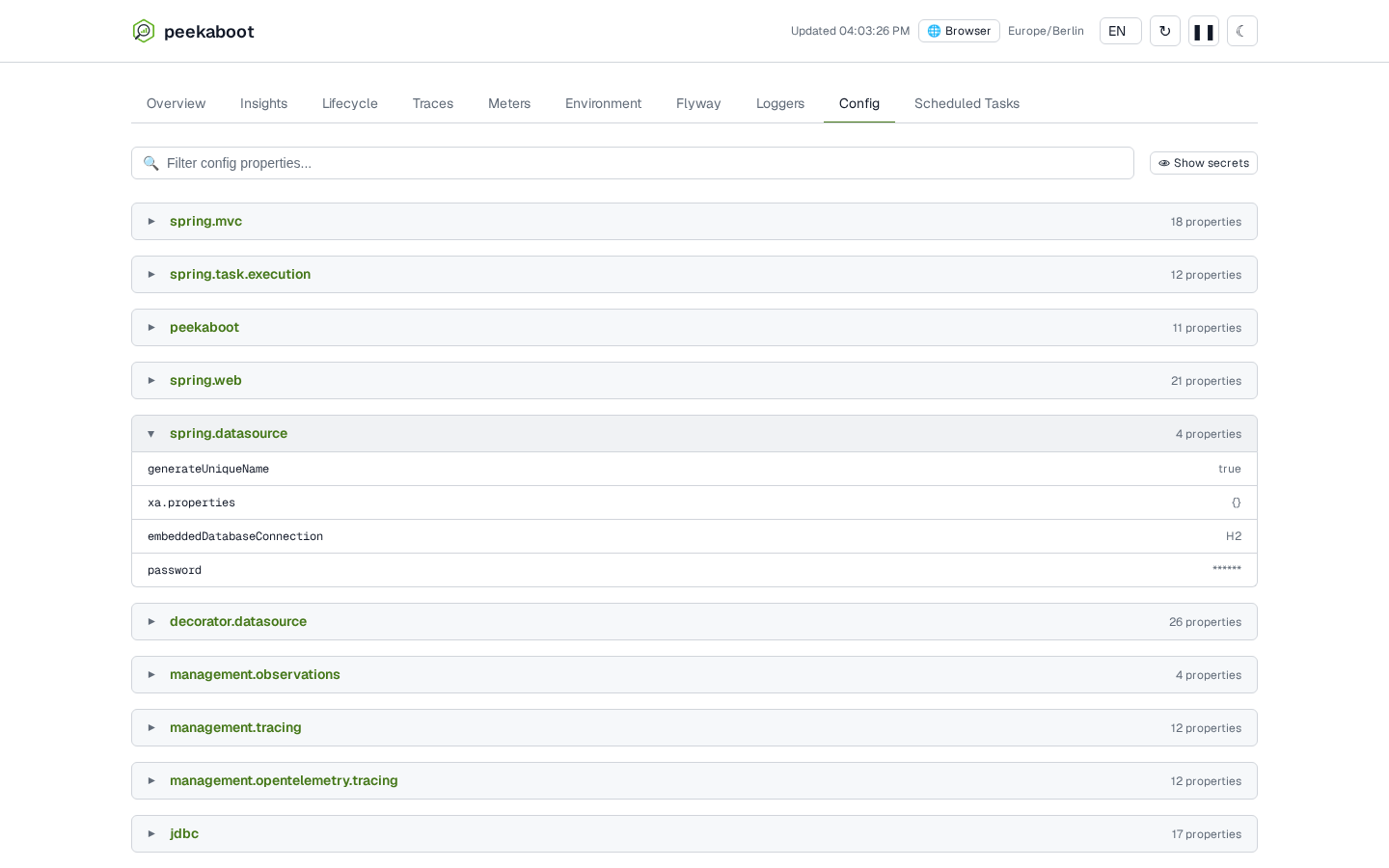
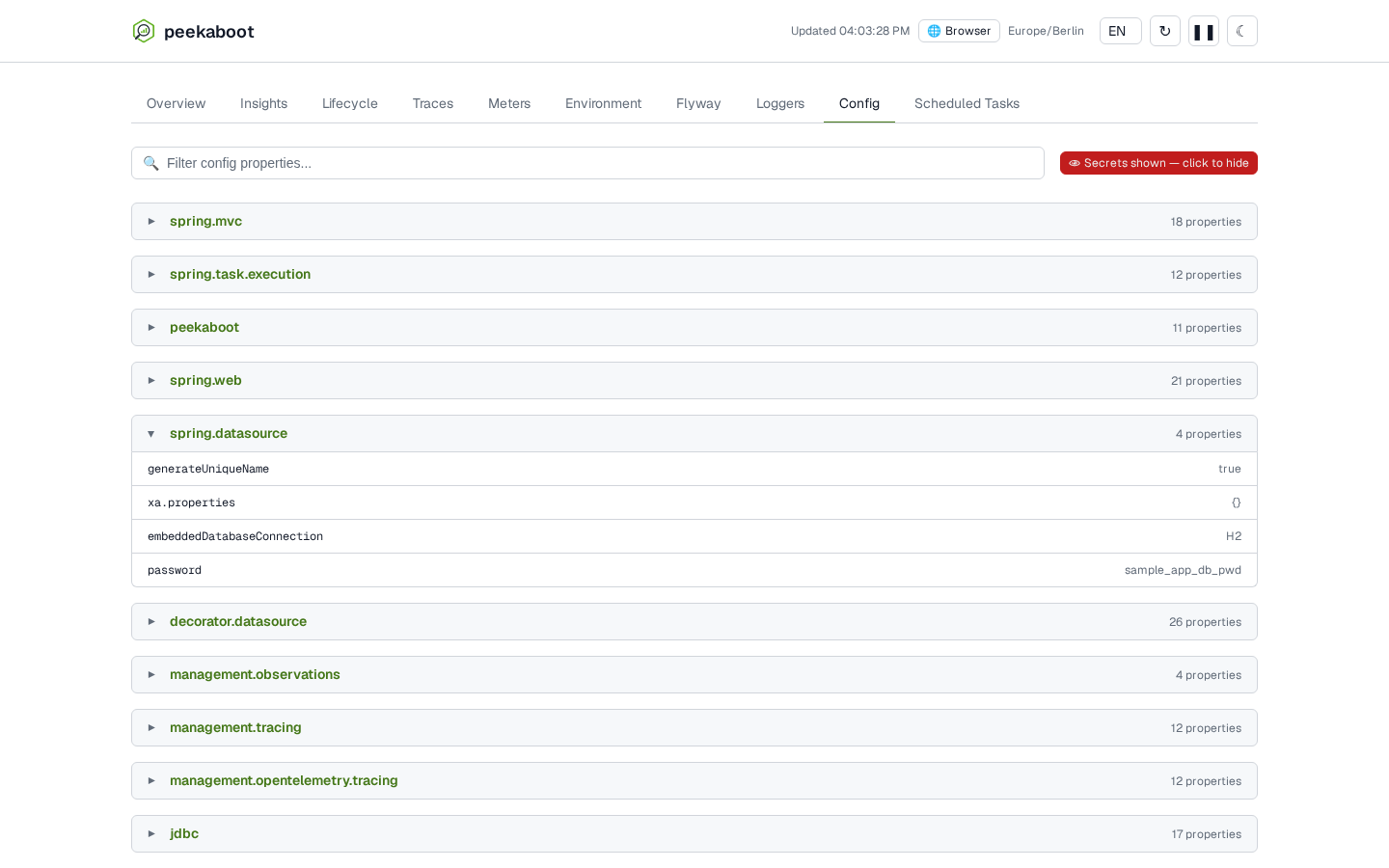
enable-unmasking on and Show secrets clicked.Securing the dashboard with Spring Security
Put a SecurityFilterChain in front of /peekaboot/** that requires a specific role:
import org.springframework.context.annotation.Bean;
import org.springframework.context.annotation.Configuration;
import org.springframework.core.Ordered;
import org.springframework.core.annotation.Order;
import org.springframework.security.config.Customizer;
import org.springframework.security.config.annotation.web.builders.HttpSecurity;
import org.springframework.security.core.userdetails.User;
import org.springframework.security.core.userdetails.UserDetailsService;
import org.springframework.security.provisioning.InMemoryUserDetailsManager;
import org.springframework.security.web.SecurityFilterChain;

@Configuration
public class PeekabootSecurityConfig {

    @Bean
    @Order(Ordered.HIGHEST_PRECEDENCE)
    public SecurityFilterChain peekabootSecurityFilterChain(HttpSecurity http) throws Exception {
        return http.securityMatcher("/peekaboot/**")
                .authorizeHttpRequests(auth -> auth.anyRequest().hasRole("ADMIN"))
                .httpBasic(Customizer.withDefaults())
                .build();
    }

    // Stands in for your application's own chain. No @Order, so it is evaluated last.
    @Bean
    public SecurityFilterChain applicationSecurityFilterChain(HttpSecurity http) throws Exception {
        return http.authorizeHttpRequests(auth -> auth.anyRequest().permitAll()).build();
    }

    // Stands in for wherever your users and roles already come from.
    @Bean
    public UserDetailsService userDetailsService() {
        return new InMemoryUserDetailsManager(
                User.withUsername("admin")
                        .password("{noop}admin-password")
                        .roles("ADMIN")
                        .build(),
                User.withUsername("user")
                        .password("{noop}user-password")
                        .roles("USER")
                        .build());
    }
}
Two rules make this work:
- The Peekaboot chain goes first. Give it
securityMatcher("/peekaboot/**")and@Order(Ordered.HIGHEST_PRECEDENCE). Leave your application’s chain without@Order. Don’t add a/peekaboot/**rule to your general chain instead, and don’t give that chain a lower order. Either way it matches/peekaboot/**first and the role check never runs. - Don’t paste
applicationSecurityFilterChain. It permits every request. If your application already has a chain, keep it and add only the first bean. If it has none, note that declaring anySecurityFilterChainswitches off Spring Boot’s default chain: every request outside/peekaboot/**then passes unsecured unless you add a chain for it.
Replace httpBasic with whatever your application uses: form login, OAuth2, a gateway header.
Use .authenticated() instead of .hasRole(...) only if every signed-in user may read
everything listed under What the dashboard and API show.
The dev toolbar asks the reader to sign in
The dev toolbar is injected into every HTML page,
whoever is reading it. Its script and data load from /peekaboot/**, so your chain decides who
sees a filled toolbar. A reader your chain refuses sees an empty bar with this link:
Peekaboot toolbar could not start — sign in, or check that its script is allowed to load
The link opens /peekaboot/. The browser gets the 401 challenge and asks for credentials.
After signing in, the toolbar fills on the next page load.
If your application sends a Content-Security-Policy:
script-srcmust allow/peekaboot/ui/toolbar/toolbar.js.'self'covers it. A nonce-only policy cannot work, because Peekaboot’s script tag carries no nonce. Without this the bar stays on the notice above for every reader.- Without
style-src 'unsafe-inline', a reader outside the role sees the notice as unstyled text at the foot of the page. Readers inside the role are unaffected.
If nothing else secures it
On a deployment launch with peekaboot.enabled=true, Peekaboot arms an HTTP Basic guard
(realm Peekaboot) on /peekaboot/**. It challenges every request that does not already carry
an authenticated, non-anonymous Spring Security principal. Without Spring Security on the class
path, it challenges every request.
The credentials:
- Username:
peekaboot.security.username, else your build’s artifact id plus-admin, elsespring.application.nameplus-admin, elsepeekaboot-admin. - Password:
peekaboot.security.password, else the hash stored insecurity.properties, else a generated 26-character password printed in the startup log’sPeekaboot Securityblock.
On a deployment, storage is off by default, so the generated password is not saved and changes on every restart. Keep it stable with one of these:
peekaboot.security.password, set from a secretpeekaboot.storage.enabled=trueon a persistent home directorypeekaboot.security.credentials-filepointing at a persistent path, for example a mounted volume in a container
Rules to know:
- A Spring Security chain that authenticates the request satisfies the guard. A VPN, an nginx basic-auth layer, an IP allowlist or an API gateway does not, because none of them puts a principal on the request. The guard still challenges behind them.
- There is no rate limit on failed attempts. Rate-limit at the proxy in front of the application.
- The
Peekaboot Securityblock logs at WARN when Spring Security is not on the class path or the toolbar is on, and at INFO otherwise. With the toolbar on, its requests make ordinary pages raise a credential dialog. - The first challenged request logs one WARN. Later failed attempts log at DEBUG.
peekaboot.security.enabled=falseturns the guard off. On a deployment launch Peekaboot then logs a WARN at startup that nothing authenticates/peekaboot/**.
Use the SecurityFilterChain above instead of relying on this guard. It has one flat
credential and no roles.
Running it on a shared or deployed server
Read Do I want this in production? first. Then:
- Set
peekaboot.enabled=true. The toolbar, storage and error page stay off unless you set them too. - Put the
SecurityFilterChainin front of/peekaboot/**before you deploy. Gate on a role, because whoever passes it reads everything under What the dashboard and API show. - Restrict network reach as well: an internal-only ingress, a VPN, or a proxy that forwards
/peekaboot/**only from trusted sources. - Leave
peekaboot.enable-unmasking=false. - If you rely on the fallback guard, keep its password stable (see above).
Production checklist
- Verify
peekaboot.enabledresolves tofalsein your deployed environment. The startup summary has noPeekaboot Dashboard:line when the dashboard is off. - Set
peekaboot.enabled=falseexplicitly if you run your build output directly on a host that is not a container (java -cp target/classes …). Peekaboot counts that as a local run. See What counts as a local run. - If Peekaboot must never ship, keep the starter out of the production artifact. See Keeping it out of the artifact entirely.
- If you turn it on somewhere reachable, put a
SecurityFilterChainin front of/peekaboot/**first. - Don’t rely on
management.endpoints.web.exposure. It does not affect/peekaboot/**. - Leave
peekaboot.enable-unmasking=false. With it on, anyone who can reach/peekaboot/**can add?unmask=true. - Don’t treat masking as complete. Log messages are never masked, and SQL and request data are masked only where a rule recognises them. Don’t point Peekaboot at traffic whose secrets must not be held in memory and displayed.
- Leave
peekaboot.dev-toolbaroff outside a local run unless you need header, parameter and log capture.peekaboot.enabled=falseturns it off too.